Guide to Setting Up Secure Home Office IT for Remote and Hybrid Teams
With people working from home, the old rules for how companies run no longer apply today. While flexibility and productivity have improved, cybersecurity risks and IT challenges have also increased. That’s where a well-planned remote work IT setup protects company data, maintains performance, and supports seamless collaboration across distributed teams.
In this guide, we’ll explain how businesses can design a secure, scalable, and reliable home office IT environment for remote and hybrid teams, covering hardware, software, network security, and best practices.
Why Secure Home Office IT Matters for Remote and Hybrid Teams
Since remote employees work without the safety net of an office network, they’re easy targets for hackers. If not properly configured, home networks, personal devices, and unsecured Wi-Fi connections can expose sensitive data. A secure remote work IT setup helps organizations:
- Reduce cybersecurity risks
- Maintain compliance with data protection regulations
- Improve system reliability and uptime
- Support productivity across locations
- Protect intellectual property and customer data
Building a strong foundation from the start minimizes long-term IT issues and costly security incidents.
Essential Hardware for a Secure Remote Work IT Setup
Business-Grade Laptops and Desktops
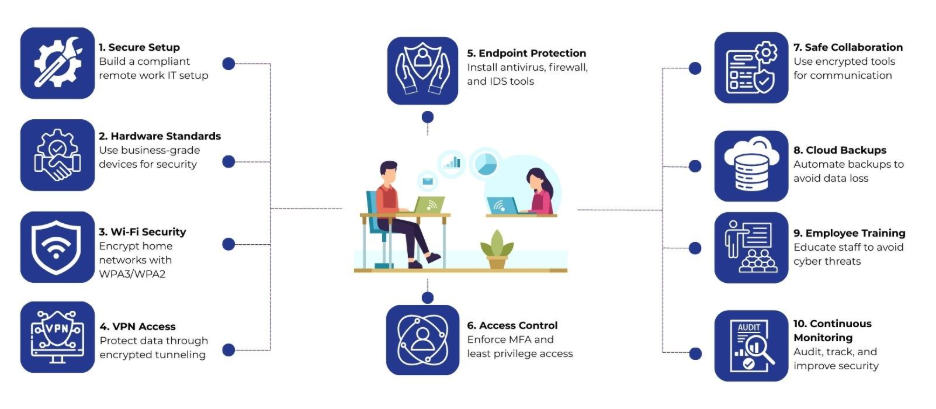
Employees should use company-approved devices with updated operating systems and security features. Business-grade laptops typically include:
- Hardware-level encryption support
- Trusted Platform Modules (TPM)
- Better firmware security than consumer devices
Standardizing hardware also simplifies IT support and patch management.
Secure Peripherals and Accessories
External monitors, keyboards, webcams, USBs, etc., should come from trusted providers, like Nurture IT in Indiranagar. IT teams should restrict the use of unknown storage devices through endpoint security policies.
Network Security for Home Offices
Secured Wi-Fi Configuration
Home routers must use modern encryption standards like WPA3 or WPA2-AES. To keep things running smoothly, set up a custom router password and check for updates regularly.
Employees should avoid public Wi-Fi networks for work tasks. If unavoidable, additional protections such as VPNs become critical.
Virtual Private Networks (VPNs)
A VPN encrypts internet traffic between the employee’s device and the company network. This reduces the risk of data interception and protects internal systems from unauthorized access.
VPN access should require:
- Strong authentication credentials
- Multi-factor authentication (MFA)
- Access restrictions based on user roles
- Endpoint Security and Device Management
Endpoint Protection Software
Every device in a remote work IT setup should run centrally managed endpoint protection tools, including:
- Antivirus and anti-malware software
- Host-based firewalls
- Intrusion detection or prevention systems
These tools provide real-time threat monitoring and automated responses.
Mobile Device Management (MDM)
MDM solutions enable IT teams to:
- Enforce security policies remotely
- Push software updates and patches
- Lock or wipe devices if lost or stolen
- Separate personal and work data
This is especially important for hybrid teams that switch between office and home environments.
Identity and Access Management (IAM)
Strong Authentication Practices
Passwords alone are no longer sufficient. A secure remote work IT setup relies on:
- Multi-factor authentication (MFA)
- Password managers to reduce reuse
- Regular credential rotation for critical systems
IAM tools help control who can access applications, files, and internal systems based on job roles.
Least Privilege Access
Employees should only receive access to the systems and data required for their responsibilities. This limits potential damage if an account is compromised and supports better compliance with security standards.
Secure Collaboration and Communication Tools
Encrypted Communication Platforms
Video conferencing, chat, and email tools should support end-to-end encryption and enterprise-grade security controls. Popular platforms often include administrative features for managing access, recording permissions, and data retention.
Secure File Sharing and Cloud Storage
Cloud storage solutions should include:
- Data encryption at rest and in transit
- Version control and audit logs
- Role-based access permissions
Public file-sharing links should be restricted or disabled where possible to reduce accidental data exposure.
Data Backup and Recovery for Remote Teams
Automated Cloud Backups
Regular backups protect against ransomware, accidental deletion, and hardware failures. Likewise, cloud-based backup systems provide off-site redundancy and rapid recovery options.
Therefore, backups should follow a defined schedule and cover:
- User devices
- Shared drives
- Critical business applications
Disaster Recovery Planning
A remote-friendly disaster recovery plan outlines how systems will be restored during outages or security incidents. This plan should include communication protocols, recovery time objectives, and access restoration steps.
Security Awareness Training for Employees
Even the most advanced remote work IT setup can fail without informed users. Therefore, employees should receive regular training on:
- Phishing and social engineering threats
- Safe password practices
- Recognizing suspicious downloads or links
- Reporting security incidents promptly
Training programs reduce human error, which remains one of the leading causes of data breaches.
Monitoring, Auditing, and Continuous Improvement
Centralized Monitoring Tools
IT teams should use centralized dashboards to track:
- Device health and compliance
- Login activity and anomalies
- Security alerts and threat responses
Spotting things early means we can take care of them right away.
Regular Security Audits
Periodic audits help identify gaps in the remote work IT setup. These audits can include:
- Vulnerability scans
- Access reviews
- Policy compliance checks
Findings should guide updates to security policies and infrastructure improvements.
Best Practices for Long-Term Remote IT Success
- Standardize hardware and software across teams
- Document IT policies clearly and make them accessible
- Keep operating systems and applications updated
- Review access rights when roles change
- Test incident response and recovery plans periodically
These practices support scalability as remote and hybrid teams grow.
Nurture IT: Your Trusted Partner for IT Helpdesk Solutions
As a leading provider of IT support in Bangalore, Nurture IT helps businesses of all sizes streamline their technology infrastructure, minimize downtime, and improve productivity.
With a team of highly skilled professionals, Nurture IT offers 24/7 support, addressing technical issues swiftly and efficiently. Whether it’s troubleshooting software glitches, managing network disruptions, or securing your IT environment, our team is equipped to tackle any challenge.
By implementing state-of-the-art tools and technologies, Nurture IT not only provides quick resolutions but also strengthens your security posture. Our solutions include remote troubleshooting, system monitoring, and robust data protection, all tailored to meet the specific needs of your business.
Final Thoughts
A thoughtfully designed remote work IT setup protects business data, supports productivity, and enables smooth collaboration across distributed teams. By combining standardized hardware, secure networks, endpoint protection, access controls, and employee awareness, businesses can reduce operational risks while supporting long-term growth in remote and hybrid work models.
Partner with Nurture IT to strengthen your remote work IT setup and support your teams with confidence in a digital-first world.
FAQs
1. What is a remote work IT setup?
A remote work IT setup includes hardware, software, network security, access controls, and support systems that allow employees to work securely from home or multiple locations.
2. Why is IT security important for remote teams?
Remote teams often operate outside corporate networks, which increases exposure to cyber threats like phishing, malware, and unauthorized access.
3. Should employees use personal devices for remote work?
Using company-managed devices is safer, as IT teams can apply security policies, updates, and monitoring more effectively.
4. How does a VPN help in a remote work IT setup?
A VPN encrypts data traffic between the user and company systems, reducing the risk of data interception on home or public networks.
5. What type of Wi-Fi security is recommended for home offices?
Home routers should use WPA2-AES or WPA3 encryption, strong passwords, and updated firmware to reduce vulnerabilities.