Device Lifecycle Management in Bangalore: When to Replace Laptops, Desktops & Servers
In Bangalore, businesses increasingly rely on technology to stay competitive. Laptops, desktops, and servers form the backbone of modern operations, but devices don’t last forever. Therefore, managing the lifecycle of these assets is important to maintain productivity, reduce downtime, and control IT costs.
Managed IT service providers in Indiranagar play a key role in guiding organizations on when and how to replace their IT infrastructure.
What is Device Lifecycle Management?
Device Lifecycle Management (DLM) is a systematic approach to managing IT assets from acquisition to disposal. It involves several phases:
- Procurement – Selecting devices based on performance, compatibility, and business needs.
- Deployment – Installing hardware, software, and security protocols.
- Usage & Maintenance – Regular updates, monitoring performance, and resolving technical issues.
- Replacement or Upgrade – Determining when devices are no longer efficient or cost-effective.
- Decommissioning & Disposal – Securely retiring devices while adhering to data protection regulations.
By following a structured lifecycle management plan, companies can avoid unexpected failures and high maintenance costs while keeping their IT environment efficient.
Signs It’s Time to Replace Laptops
Laptops are often the most mobile component of an IT infrastructure. Here are key indicators that it’s time to replace them:
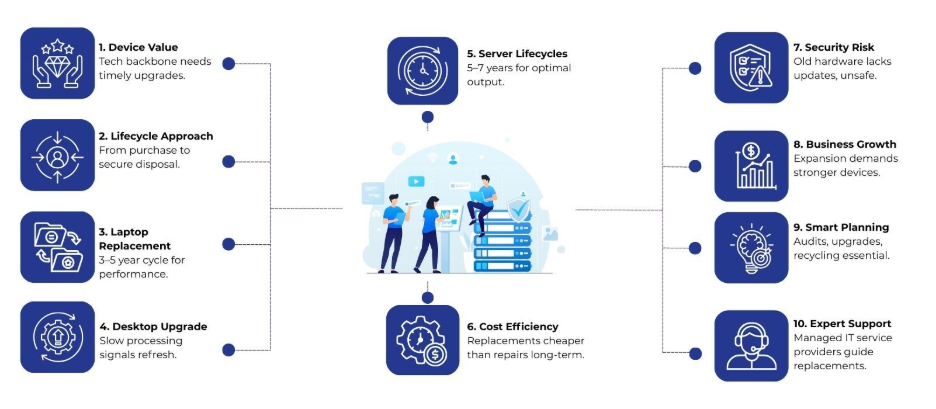
- Performance Decline – Laptops older than 3-5 years typically experience slow boot times, frequent crashes, and difficulty running modern software.
- Battery Issues – Reduced battery life or the inability to hold a charge affects mobility and productivity.
- Hardware Limitations – Older laptops may not support the latest operating systems or applications, limiting functionality.
- Frequent Repairs – Recurrent hardware failures, such as faulty keyboards, screens, or ports, can cost more than replacement.
Managed IT service providers often recommend a replacement cycle of every 3-5 years for laptops to maintain optimal performance and reduce operational disruptions.
When to Replace Desktops
Desktops are less mobile but often handle heavier workloads, particularly in design, analytics, or development environments. Replacement considerations include:
- Performance Bottlenecks – If desktops take longer to process tasks, run modern applications inefficiently, or fail to handle multiple programs simultaneously, it’s a sign for an upgrade.
- Aging Components – Hard drives, RAM, and graphics cards degrade over time. While some components can be upgraded, frequent failures may indicate the need for a full replacement.
- Compatibility Issues – Legacy desktops may not support modern peripherals, software updates, or security protocols.
- Energy Efficiency – Newer desktops consume less power, which can reduce energy costs in large offices.
On average, desktops have a lifecycle of 4–6 years. However, working with managed IT service providers allows businesses to plan replacements strategically and budget for upgrades without disrupting operations.
Server Lifecycle Management
Servers are critical for storing data, running applications, and supporting enterprise operations. Replacing servers is often more complex than replacing desktops or laptops due to their central role in IT infrastructure. Factors to consider include:
- Hardware Age – Servers older than 5-7 years may fail to meet current performance standards. Aging hardware can lead to slow processing, increased downtime, and higher maintenance costs.
- Capacity Limitations – As data volumes grow, older servers may struggle with storage, processing power, or network performance.
- Software Compatibility – Outdated servers may not support the latest server operating systems, virtualization platforms, or security updates.
- Energy Consumption – Older servers consume more electricity and generate heat, increasing cooling requirements.
- Maintenance Costs – Frequent repairs and spare parts for older servers can become expensive.
Managed IT service providers like Nurture IT in Indiranagar typically recommend regular assessments of server performance and replacement or upgrade planning every 5–7 years. Businesses can also explore hybrid approaches, such as migrating workloads to cloud servers while gradually phasing out older on-premises hardware.
Factors Influencing Device Replacement
Device replacement is not just about age. Several factors influence the decision:
- Business Needs – Companies expanding operations or adopting new software may require more powerful devices.
- Cost of Ownership – The total cost of maintaining old devices, including energy, repairs, and downtime, may exceed the cost of replacement.
- Security Risks – Outdated devices may not receive critical security patches, increasing vulnerability to cyberattacks.
- Regulatory Compliance – Certain industries have strict data handling and privacy regulations requiring up-to-date hardware.
By analyzing these factors, managed IT service providers help businesses in Bangalore create a replacement strategy tailored to operational and financial goals.
Best Practices for Device Lifecycle Management
Adopting best practices in device lifecycle management can extend the usability of IT assets and reduce business risk. Key practices include:
- Regular Audits – Periodically evaluate device performance, age, and maintenance history.
- Standardization – Use standardized hardware and software configurations to simplify maintenance and support.
- Upgrade Planning – Schedule incremental upgrades for components like RAM or storage to delay full replacement when feasible.
- Data Management – Implement secure data backup and recovery procedures before decommissioning devices.
- Sustainable Disposal – Partner with certified e-waste recyclers to responsibly dispose of retired hardware.
Following these practices allows organizations to optimize IT investments, minimize disruptions, and maintain secure, high-performing environments.
Role of Nurture IT in Device Lifecycle Management
Nurture IT brings expert guidance across all stages of device lifecycle management. We can:
- Conduct comprehensive asset audits and performance assessments to understand your IT environment.
- Recommend replacement schedules tailored to device type, workload, and your business growth.
- Manage procurement, deployment, and configuration of new laptops, desktops, and servers.
- Provide continuous monitoring and maintenance to extend the life of your devices.
- Handle secure decommissioning and eco-friendly recycling of retired hardware.
Partnering with Nurture IT gives your business a proactive approach to IT management, minimizing unexpected downtime and supporting long-term operational efficiency.
Final Thoughts
Any business that wants strong, secure IT needs proper device lifecycle management. Laptops, desktops, and servers each have unique lifecycles, and knowing when to replace them reduces downtime, enhances performance, and controls costs. By partnering with managed IT service providers like Nurture IT in Indiranagar, organizations gain access to expert guidance on procurement, deployment, monitoring, and decommissioning.
Let us handle your device lifecycle, so your team can focus on driving business growth.
FAQs
- What is device lifecycle management?
Device lifecycle management is the process of managing IT assets from procurement to decommissioning, including maintenance, upgrades, and replacement planning.
- How do I know if my servers need replacement?
Servers older than 5–7 years, or those struggling with processing power, storage, or software compatibility, may require replacement or upgrade.
- How do managed IT service providers help with device lifecycle management?
Managed IT service providers conduct audits, recommend replacement schedules, handle procurement and deployment, provide maintenance, and manage secure decommissioning.
- What is the role of performance monitoring in device lifecycle management?
Performance monitoring tracks device health, detects early signs of slowdown, and helps businesses plan timely replacements to avoid downtime.