Cyber Hygiene for Bangalore Offices: Simple Habits Every Employee Must Follow
In this digital era, offices are increasingly dependent on technology for day-to-day operations. With this reliance comes the rising threat of cyberattacks, data breaches, and digital fraud. Therefore, practicing good cyber hygiene for Bangalore offices is no longer optional; it’s necessary for protecting sensitive business data, client information, and company reputation. While businesses often invest in advanced cybersecurity systems, the role of employees in maintaining cyber safety is equally important. Simple habits adopted consistently can greatly reduce risks and create a secure digital environment.
Understanding Cyber Hygiene
Cyber hygiene refers to the practices and steps employees follow to maintain system health and safeguard sensitive data. It covers a wide range of activities, including secure password management, software updates, safe internet usage, and awareness of phishing and malware threats. Just as personal hygiene protects our physical health, cyber hygiene protects digital assets and business operations.
For Bangalore offices, which often handle vast volumes of client data, internal records, and financial information, adopting strong cyber hygiene habits helps maintain productivity and reduces the likelihood of cyber incidents.
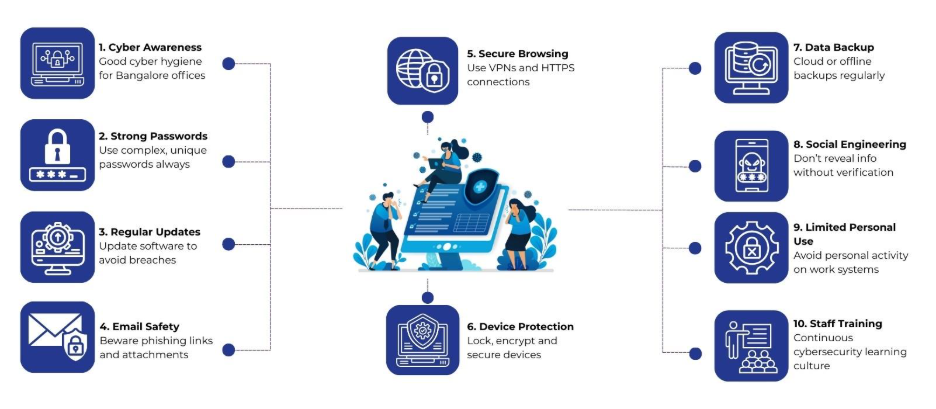
1. Strong Password Practices
Passwords are the first line of defense against unauthorized access. Employees must avoid using simple, predictable passwords like “123456” or “password.” Instead, creating complex passwords with a combination of letters, numbers, and special characters provides better protection. Using unique passwords for different accounts limits the damage if a single account is compromised.
Employees can also adopt password managers to store and retrieve login credentials securely. Two-factor authentication (2FA) adds another layer of security by requiring a second form of verification, such as a mobile code or authentication app.
Tip: Change passwords periodically, especially after suspicious activity or security alerts.
2. Regular Software Updates
Outdated software and operating systems are a common entry point for cybercriminals. Hackers exploit vulnerabilities in unpatched software to gain unauthorized access or install malware. Therefore, employees should regularly update all applications, operating systems, and antivirus programs.
IT departments can schedule automated updates and notify employees of pending patches. Keeping software current helps maintain a secure work environment and reduces potential attack surfaces.
3. Safe Email Practices
Phishing attacks remain one of the most prevalent cyber threats in offices. Employees may receive emails that appear to be from trusted sources, requesting sensitive information or prompting them to click on malicious links.
To practice good cyber hygiene for Bangalore offices, employees must:
- Verify sender email addresses and look for inconsistencies.
- Avoid clicking on suspicious links or downloading unknown attachments.
- Report suspected phishing emails to the IT team promptly.
Regular training on recognizing phishing attempts can empower employees to make informed decisions and prevent data breaches.
4. Secure Internet Usage
Browsing unsecured websites or using public Wi-Fi without protection can expose sensitive company information. Employees should use secure, encrypted networks, especially when accessing company systems remotely.
For added security, employing Virtual Private Networks (VPNs) enables encrypted communication and reduces the risk of interception. Websites with HTTPS protocols offer secure connections and should be preferred over unsecured HTTP sites.
Employees should also avoid downloading software or tools from unverified sources, as these can contain malware or spyware.
5. Device Security
Employee devices, including laptops, desktops, and mobile phones, are often targeted by cybercriminals. Therefore, installing antivirus software, firewalls, and security patches helps defend against potential threats.
Likewise, physical security is equally important. Devices should be locked when not in use, and access should be restricted through password-protected screens. For mobile devices, features like biometric authentication or PIN codes can prevent unauthorized access if the device is lost or stolen.
6. Data Backup and Management
Data loss due to cyberattacks, hardware failure, or accidental deletion can have serious consequences. Therefore, employees should regularly back up important files to secure cloud storage or offline media.
For offices handling client data, implementing structured data management policies like role-based access controls and folder encryption reduces the risk of unauthorized access or accidental leaks.
7. Awareness of Social Engineering
Cyber hygiene is not just about technology; it also involves understanding human manipulation tactics. Social engineering attacks trick employees into revealing confidential information or performing actions that compromise security.
Employees should be cautious when asked to share login credentials, company financial details, or sensitive client information over phone calls, emails, or messaging apps. Verifying requests through official channels protects both the employee and the organization.
8. Limiting Personal Use of Work Devices
Using company devices for personal activities can increase exposure to cyber threats. Personal email, social media, or gaming applications may inadvertently download malware that affects the entire office network.
Offices benefit from defining clear policies regarding personal use of work devices. Therefore, employees should follow these guidelines and separate work and personal digital activities wherever possible.
9. Encrypt Sensitive Communications
Encryption converts readable information into a coded format, making it inaccessible to unauthorized users. Employees handling sensitive data, such as financial reports, client contracts, or proprietary information, should use encrypted communication channels, including secure email platforms and messaging apps.
This practice is especially important in offices where remote work or off-site collaboration is common, as it protects data during transmission over potentially insecure networks.
10. Regular Cybersecurity Training
One of the most effective methods to strengthen cyber hygiene in Bangalore offices is continuous education. Employees should participate in periodic training sessions that cover emerging threats, best practices, and office-specific security policies.
Interactive sessions, real-world examples, and simulations of phishing attacks can increase awareness and make security protocols easier to follow. Encouraging a culture of cyber vigilance allows employees to act as active participants in safeguarding organizational data.
How Nurture IT Supports Your Cybersecurity
Nurture IT goes beyond standard measures to strengthen your organization’s cybersecurity.
Access Management: Nurture IT offers Identity Access Management (IAM) solutions to manage digital identities, assign user roles, and implement Multi-Factor Authentication (MFA) for secure access.
Our firewalls, whether physical, cloud-based, or device-specific, control network traffic, while VPN solutions provide encrypted connections for safe remote access. Active Directory services streamline authentication, access controls, and group policy management.
Data Management: We implement robust backup strategies following the 3-2-1 rule and WORM policies to protect critical data. Information Rights Management (IRM) restricts access to authorized personnel. In the event of a cyberattack, Nurture IT helps create recovery plans that restore systems and data quickly, reducing operational disruptions.
Data Protection: Advanced Endpoint Protection Platforms (EPP), antivirus solutions, and USB blocking guard against malware and cyber threats. Mobile Device Management (MDM) secures corporate devices, while Data Loss Prevention (DLP) technologies monitor and prevent unauthorized data access or leaks.
With Nurture IT, organizations can strengthen digital defenses, protect valuable information, and respond swiftly to cyber threats.
Final Thoughts
Practicing good cyber hygiene for Bangalore offices is a collective responsibility. While IT systems and software provide protection, employees play a critical role in maintaining digital security. Simple habits like strong password management, regular updates, cautious email handling, and secure internet usage can significantly reduce risks.
For guidance on implementing robust cybersecurity measures in your office, reach out to Nurture IT in Indiranagar and protect your business from emerging digital threats.
FAQs
- Why is cyber hygiene important for Bangalore offices?
Bangalore offices handle large volumes of client data and internal records. Following good cyber hygiene habits reduces the risk of cyberattacks, data breaches, and productivity loss.
- How can employees create strong passwords?
Employees should use a combination of letters, numbers, and special characters, avoid predictable passwords, and use unique passwords for each account. Two-factor authentication adds an extra layer of security.
- How often should software be updated in offices?
Employees should update operating systems, applications, and antivirus programs regularly. Updates help protect against vulnerabilities that hackers can exploit.
- What are safe email practices for employees?
Employees should verify sender addresses, avoid clicking suspicious links, avoid downloading unknown attachments, and report any suspicious emails to the IT team.
- How can employees protect devices from cyber threats?
Employees can use antivirus software, firewalls, and strong passwords. Locking devices when not in use and using biometric authentication or PIN codes adds extra protection.