Optimizing Your Wi-Fi Network: A Guide to Faster Internet
Let’s be honest—there’s nothing more frustrating than a sluggish internet connection. In an age where video calls, streaming, smart home devices, and cloud gaming are part of daily life, having a fast and stable Wi-Fi network is no longer optional. So, if you’re tired of buffering wheels and dropping connections, it’s time to take control of your network.
In this guide, we’ll walk through practical steps to optimize your Wi-Fi performance, dive into some advanced strategies using Cisco networking solutions, and highlight the technologies that can take your home or office network from average to exceptional.
Why Your Wi-Fi Might Be Slowing Down
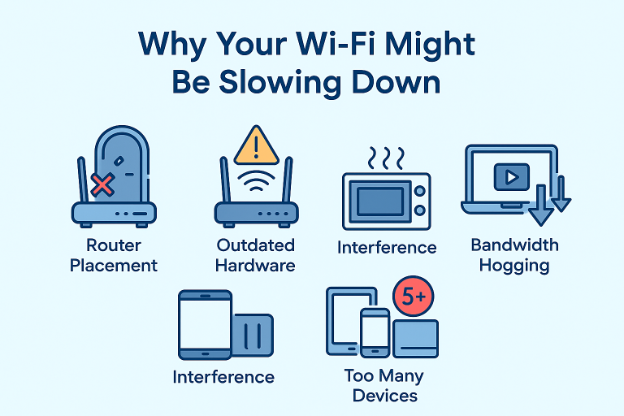
Before jumping into solutions, it helps to understand the common culprits behind poor wireless performance:
- Router Placement: Location matters more than most people think. Putting your router in a corner, behind walls, or near metal objects can weaken the signal.
- Outdated Hardware: An old router may not support newer Wi-Fi standards like Wi-Fi 6 or 6E, which offer significant speed and capacity improvements.
- Interference: Microwaves, cordless phones, baby monitors, and even your neighbour’s Wi-Fi can interfere with your signal.
- Bandwidth Hogging: Smart TVs, streaming devices, cloud backups, and Zoom meetings can consume large chunks of your bandwidth.
- Too Many Devices: With everything from doorbells to dishwashers connected to the internet, your network might be overloaded without you realizing it.
Let’s get to the solutions.
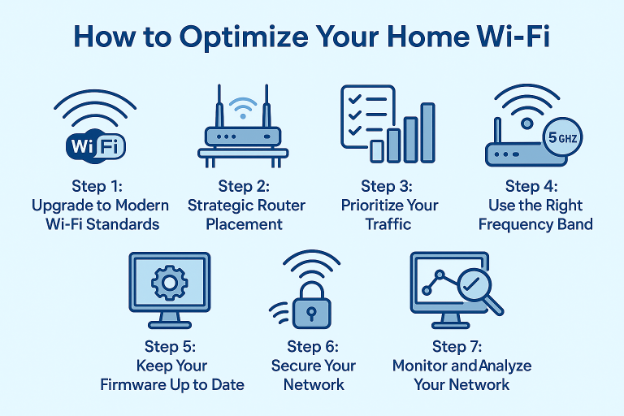
Step 1: Upgrade to Modern Wi-Fi Standards
The first and most impactful step you can take is to switch to the latest Wi-Fi standard. Wi-Fi 7 (802.11be) offers faster speeds, better performance in crowded environments, and improved battery life for connected devices.
Cisco networking solutions offer enterprise-grade Wi-Fi 7 (802.11be) access points, such as the Cisco Wireless 9176 and 9178 Series, designed for demanding business environments and advanced home networks. These solutions deliver exceptional speed, capacity, and reliability, surpassing basic connectivity needs. Leveraging technologies like Radio Resource Management (RRM) and advanced interference mitigation, Cisco Wi-Fi 7 systems optimize performance in device-dense environments while minimizing disruptions even during peak usage hours.
Pro tip: If you have a fast internet plan (say, 500 Mbps or more), but your devices or router only support Wi-Fi 5 or earlier, you’re not getting your money’s worth. Upgrading your hardware is like removing a bottleneck from a high-speed highway.
Step 2: Strategic Router Placement
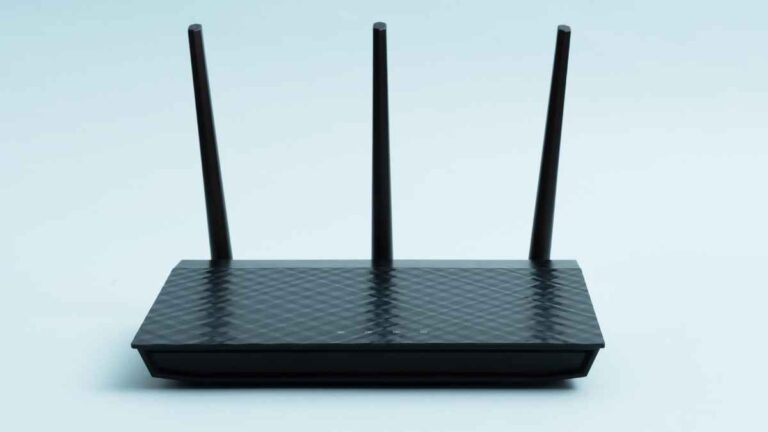
Where you put your router matters. Wi-Fi signals are essentially radio waves, and they don’t like obstacles. Thick walls, metal surfaces, and furniture can all absorb or reflect the signal, weakening your connection.
Here are a few placement tips:
- Place the router in a central location, elevated, and out in the open.
- Avoid placing it near large appliances or behind furniture.
- Keep it away from microwaves, baby monitors, and other sources of interference.
If you’re working with a large space or multiple floors, consider a Cisco networking solution like a mesh Wi-Fi system. Cisco’s Meraki Go series, for instance, offers plug-and-play mesh networking for small businesses or large homes, delivering seamless coverage from corner to corner.
Step 3: Prioritize Your Traffic
Not all internet traffic is equal. You don’t want a file download slowing down a Zoom call or a security camera lagging while your kids stream YouTube.
That’s where Quality of Service (QoS) comes in. QoS allows your router to assign priority to certain types of traffic—like video calls, gaming, or streaming—so they get bandwidth preference.
Cisco routers, particularly those with advanced management interfaces like Cisco Smart Software Manager, provide granular control over traffic flow. This level of control helps businesses and tech-savvy users maintain consistent performance across critical applications.
Step 4: Use the Right Frequency Band
Modern routers commonly operate on two frequency bands: 2.4 GHz and 5 GHz, with newer, high-end models also supporting a third band, 6 GHz. Here’s the breakdown:
- 2.4 GHz: Longer range but more interference and slower speeds.
- 5 GHz: Shorter range but faster and less crowded.
- 6 GHz: Ultra-fast, ultra-low latency, but currently has limited device support.
Choosing the right band can dramatically improve your experience. If you’re close to your router, 5 GHz or 6 GHz is your best bet. If you’re farther away, 2.4 GHz may provide better coverage—even if it’s slower.
Many Cisco networking solutions offer band steering, which automatically guides devices to the optimal frequency band based on signal strength and congestion. It’s a behind-the-scenes feature that can make your network feel faster without lifting a finger.
Step 5: Keep Your Firmware Up to Date
Firmware is the software that runs on your router. Manufacturers regularly release updates that fix bugs, patch security holes, and improve performance.
Ignoring these updates can leave you vulnerable and limit your router’s capabilities.
With Cisco networking solutions, especially enterprise and SMB-grade equipment, automatic updates are often included as part of the system’s cloud-managed interface. This minimizes downtime and keeps your network running smoothly and securely.
Step 6: Secure Your Network
A slow network might not be a technical issue—it could be that someone’s freeloading off your Wi-Fi.
Steps to take:
- Use WPA3 encryption (or at least WPA2 if your hardware is older).
- Create a strong password that’s not easy to guess.
- Disable WPS, which is convenient but less secure.
- Set up a separate guest network for visitors.
Cisco gear often includes advanced security features like threat detection, client isolation, and customizable access controls, which help keep intruders out and protect sensitive data.
Step 7: Monitor and Analyze Your Network
To really understand what’s happening on your network, you need visibility. Which devices are using the most data? When does your usage peak? Is a particular app hogging bandwidth?
Cisco networking solutions offer powerful analytics tools like Meraki Dashboard, which provides real-time traffic insights, client history, and performance metrics. These tools are invaluable for identifying problems and making data-driven improvements.
Even in smaller networks, being able to visualize your traffic patterns can help you make smarter decisions—whether it’s moving a device to another band or setting a limit on streaming apps during work hours.
Bonus Tips for Advanced Users
If you’re ready to go even deeper, these advanced strategies can help you squeeze every drop of performance out of your network:
- Use VLANs to segment traffic (e.g., keep IoT devices separate from work devices).
- Enable MU-MIMO for simultaneous data streams on supported devices.
- Add an Access Point in high-traffic areas instead of relying solely on one router.
- Deploy a Load Balancer if you have multiple internet connections.
- Schedule Reboots during off-hours to refresh router memory and performance.
Most consumer-grade routers don’t support these features, but Cisco networking solutions do. Their small business and enterprise models are built to scale with your needs, giving you the kind of reliability and control that professionals depend on.
Why Choose Nurture IT?
- Certified Cisco Partner – Access to the latest Cisco technologies and expert configuration.
- End-to-End Network Planning – From site surveys to installation and ongoing support.
- Tailored Solutions – Custom-designed infrastructure to match your business size and growth.
- Enterprise-Grade Security – Protect data and devices with Cisco’s advanced security features.
- Managed Services – Let Nurture IT handle network monitoring, updates, and troubleshooting.
Whether you’re a startup, a growing mid-size company, or an enterprise looking to optimize your IT environment, Nurture IT delivers dependable Cisco-powered networking—so you can stay focused on growing your business.
Wrapping It Up
Optimizing your Wi-Fi network isn’t about chasing theoretical speeds—it’s about building a reliable, fast, and secure experience that fits how you live and work. So don’t settle for spotty connections or subpar speeds. Take charge of your network with Nurture IT. Contact us today!
FAQs
1. Who should consider using Cisco networking solutions?
Businesses of all sizes—from startups to global enterprises—can benefit from Cisco networking solutions. They’re ideal for organizations that need reliable performance, strong network security, and scalable infrastructure.
2. Are Cisco networking solutions suitable for small businesses?
Absolutely. Cisco offers tailored networking products specifically for small businesses, including the Meraki Go line, which delivers enterprise-grade reliability with simple setup and management.
3. Can Cisco networking solutions help improve network security?
Yes, Cisco networking solutions come equipped with advanced security features like threat detection, firewalls, VPN support, and zero-trust access control, helping protect your data and devices from cyber threats.
4. Do Cisco networking solutions support cloud-based management?
Yes. Cisco’s Meraki line is fully cloud-managed, allowing you to monitor and control your network remotely, receive real-time alerts, and deploy updates with minimal downtime.
5. Can Cisco networking solutions be integrated with existing IT infrastructure?
In most cases, yes. Cisco products are designed with compatibility in mind and can integrate with a wide range of third-party hardware and software, making network upgrades smooth and minimally disruptive.